
New Thank You for your Purchase

  • Home
  • New Thank You for your Purchase

🎉 Thank You for Choosing Whole Body Health

We’ve received your order. Please review the details below to continue with your care.

Please follow the steps below to complete your onboarding and begin care.

Step 1: Register in Our Patient Portal

Click the Register Now button below to create your account in our secure patient system.

The registration screen will look like the image shown below.
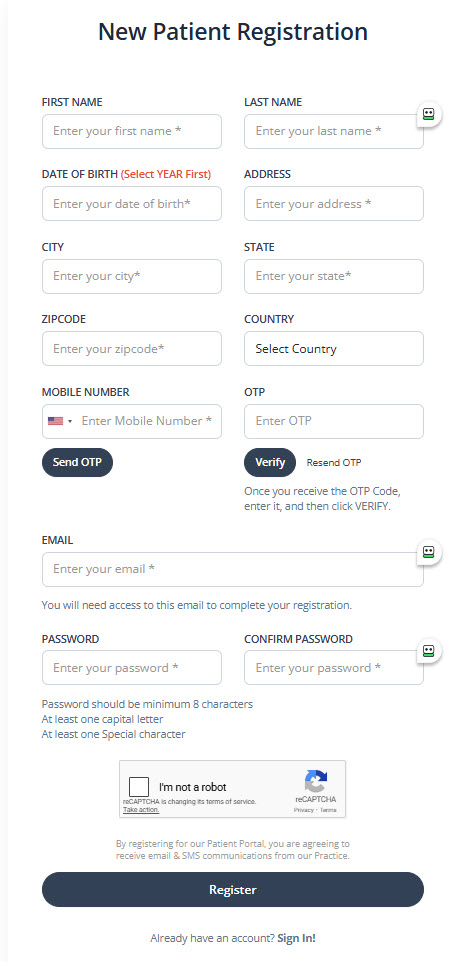
Patient Portal Registration Screen

Step 2: Activate Your Account

After completing registration, check your email and click the Activate button to log in to the patient portal for the first time.

Step 3: Await Treatment Confirmation

Once your information has been reviewed, you will receive an email and/or text confirming your treatment.

After receiving this notification, log back into the portal to:

  • Review any pre-treatment instructions (if applicable)
  • Complete all required tasks in your account
Important items to review in the portal:
  • Pharmacy Section:
    Enter your preferred pharmacy for prescription services.
    Note: This step does not apply to peptides, testosterone, Vitamin D, or GLP-1 medications.
  • Consents:
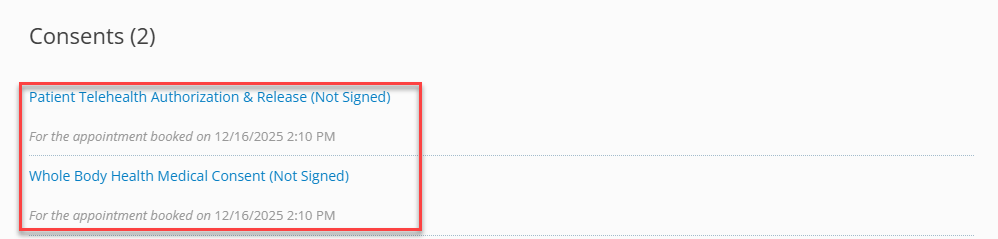
    Please complete all consent forms marked “Not Signed.”
Portal Sections Screenshot

Step 4: Complete Any Required Labs

If lab testing is required for your care, it must be completed and uploaded to your portal before your provider visit.

  • Your pre-treatment email will confirm whether labs are required.
  • Labs are completed at the location you selected during scheduling.
  • Our team will assist with uploading results, but you are responsible for visiting the selected location to complete testing.
Lab Instructions Screenshot

Step 5: See a Provider

Once all required consents and labs have been submitted, you will receive an email with a direct link to meet with a licensed provider.

Why You May See Different Websites

To provide your care, Whole Body Health Medical uses a few trusted, secure systems. You may notice different website names during your journey—this is normal, and each one has a specific purpose.

WholeBodyHealthMedical.com

Our main website — where you learn about our services and purchase your care. You will have a separate username and password for this site, which you have just set up to purchase the service. You will use this secure login to make future purchases and view your order history.

🩺 Aesthetic Record

Our secure medical records system — where you’ll register, complete required forms, and access your patient portal. For privacy and HIPAA compliance, Aesthetic Record uses a different username and password than our main website.

After registering, please wait for our team to contact you with next steps.

👉 Please bookmark both sites for easy access:

📄 Qualiphy

Our compliance partner — used to perform Good Faith Exams (GFEs). After you’ve spoken with our team and signed your consent forms, you will receive an email from Qualiphy for your virtual visit with one of our providers. Once you've the received the Qualiphy email, you may click the link in the email to immediately be connected with a provider.

All systems are secure and HIPAA-compliant. If you ever have questions or are unsure about a message you receive, our team is happy to help.

Cart

No products in the cart.